
SMBIOS: The Bridge Between Hardware and Operating Systems (Linux and Windows)

Introduction
Modern PCs are built as a stack of layers: physical hardware at the bottom, applications at the top, and an operating system (OS) in the middle that orchestrates everything. For the OS to work correctly, it first needs to discover what hardware is present: CPU type, memory configuration, motherboard, chassis, and firmware version.
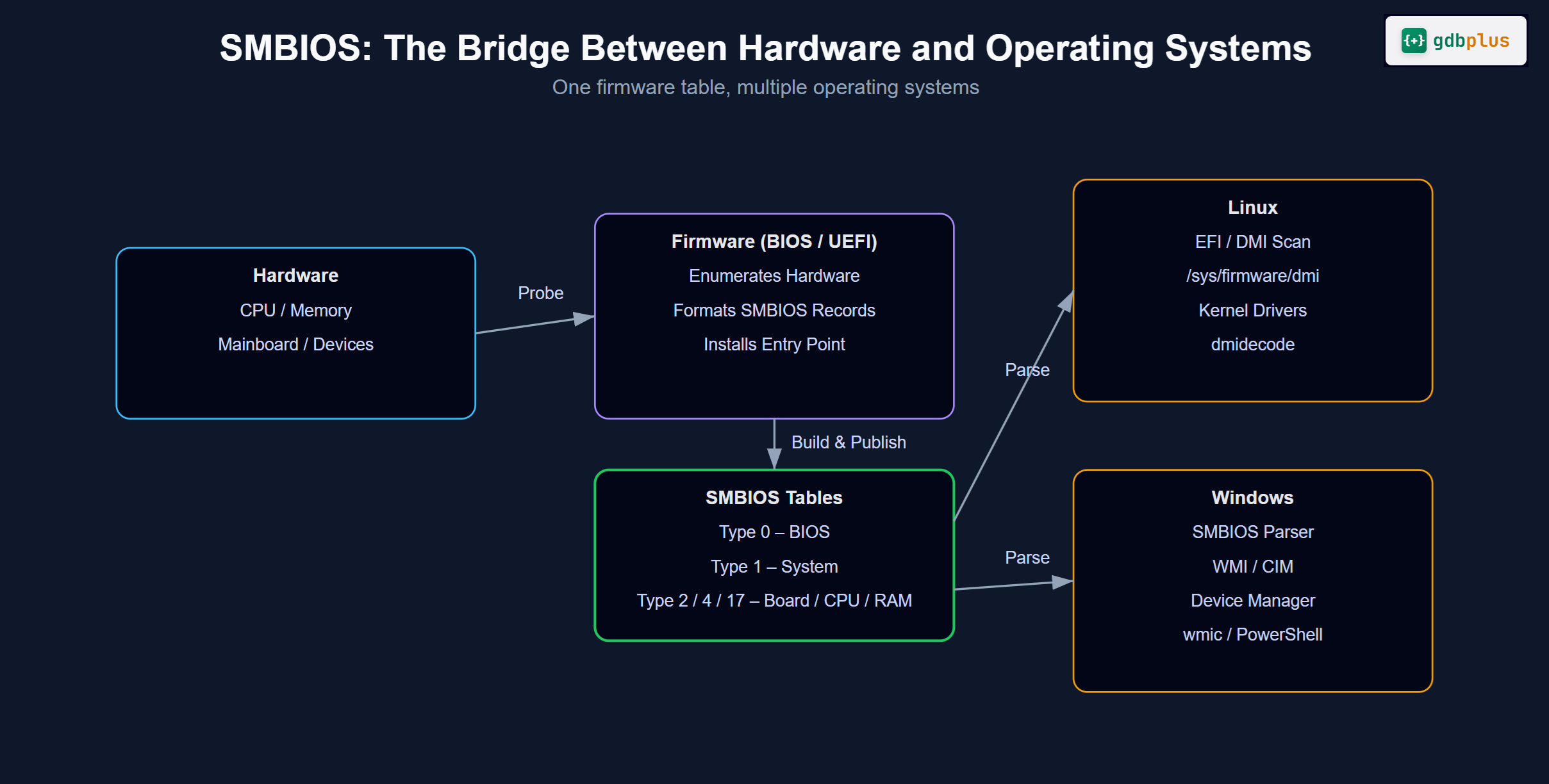
On x86/PC-class systems, one of the key mechanisms for this discovery is SMBIOS (System Management BIOS). SMBIOS is a standardized way for the system firmware (BIOS/UEFI) to describe hardware and system configuration to the operating system and management tools. It is a crucial bridge between hardware and OS, and it is used by both Linux and Windows.
This article introduces SMBIOS, explains how it works, and shows how it is exposed and used in Linux and Windows.
What Is SMBIOS?
SMBIOS (System Management BIOS) is a specification that defines:
What kinds of hardware and system information firmware should expose
(for example: system manufacturer, model, serial numbers, memory devices, slots, BIOS version).How that information is encoded in structured tables (SMBIOS structures / DMI tables).
Where and how the OS can find those tables in system memory.
Instead of probing hardware blindly, the OS and tools can read SMBIOS tables to quickly understand the platform they are running on.
SMBIOS vs BIOS vs UEFI vs ACPI
It is important to distinguish related concepts:
BIOS/UEFI: The firmware that initializes hardware and boots the OS. UEFI is the modern replacement for legacy BIOS, but both can provide SMBIOS tables.
SMBIOS: A data format and access method implemented by firmware to describe system and hardware information.
ACPI: Another specification that provides tables describing system hardware, especially for power management and device configuration.
In simple terms:
SMBIOS describes “what is present” (inventory and identification).
ACPI describes “how to use it and manage power” (device configuration and power states).
Why SMBIOS Matters
For Operating Systems
Operating systems use SMBIOS to:
Identify system vendor and product name (for hardware-specific quirks).
Discover memory topology (number of slots, what is installed).
Read BIOS/firmware versions and dates.
Recognize chassis type (desktop, laptop, server).
Learn about baseboard (motherboard) and other onboard components.
This information helps the OS:
Apply platform-specific workarounds and driver behavior.
Support system management and inventory.
Provide diagnostic data for support tools.
For Administrators and Tools
SMBIOS is heavily used by:
Inventory and asset management systems (serial numbers, asset tags, chassis info).
Monitoring and management tools in data centers.
Support and diagnostic utilities that need to know exact platform details without opening the chassis.
SMBIOS offers a standardized, firmware-supplied “source of truth” available very early, before any vendor-specific driver stack is running.
SMBIOS Data Model: Structures and Types
Overall Layout
At runtime, firmware exposes SMBIOS as a set of variable-length structures packed into a table. Each structure has:
A type (integer, identifies the kind of information).
A length (size of the fixed part of the structure).
A handle (identifier).
A set of fixed fields (bytes, words, etc.).
A list of strings stored after the fixed fields, referenced by index.
Software walks through this table, structure by structure, reading and decoding the fields and associated strings.
Common SMBIOS Structure Types
Some of the most useful and commonly referenced structure types are:
Type 0 – BIOS Information
BIOS/UEFI vendor, version, release date, supported features.Type 1 – System Information
System manufacturer, product name, version, serial number, UUID, SKU, family.Type 2 – Baseboard (Motherboard) Information
Board maker, product name, version, serial number, asset tag.Type 3 – Chassis Information
Chassis type (desktop, notebook, rack, blade, etc.), lock, serial number, asset tag.Type 4 – Processor Information
CPU type, family, manufacturer, ID, core counts, speeds.Type 17 – Memory Device
Individual DIMM slots: capacity, type (DDR4/DDR5, etc.), speed, manufacturer, serial, part number.Type 19 – Memory Array Mapped Address
How memory devices map into system address space.
Together these structures form a hardware inventory and configuration description.
Where SMBIOS Lives and How the OS Finds It
In Firmware and Memory
During boot, firmware:
Builds the SMBIOS table (set of structures).
Places it in system memory.
Provides an entry point structure that tells the OS:
The SMBIOS version.
The start address of the table.
The total size of the table.
The OS locates this entry point in a defined memory range or via firmware interfaces, then parses the table.
SMBIOS 2.x vs SMBIOS 3.x
SMBIOS 2.x
Uses a 32-bit entry point.
Typically found in the 0xF0000–0xFFFFF physical memory range (legacy BIOS era).
Has size limitations and is oriented around 32-bit addressing.
SMBIOS 3.x
Uses a 64-bit entry point structure (
_SM3_signature).Supports larger table sizes and modern systems with many devices.
Better suited to UEFI and large-scale platforms (servers, multi-socket systems).
Modern systems usually provide a 3.x entry point, sometimes alongside 2.x for compatibility.
SMBIOS in Linux
How Linux Accesses SMBIOS
On Linux, the kernel:
Finds the SMBIOS entry point during boot (via BIOS/UEFI).
Parses the SMBIOS tables.
Exposes the information to user space via:
/sys/firmware/dmi/tables/sys/class/dmi/idTools such as
dmidecode
Key Linux Interfaces
Raw SMBIOS data:
/sys/firmware/dmi/tables/DMI
Raw SMBIOS/DMI table binary./sys/firmware/dmi/tables/smbios_entry_point
Raw entry point structure.
Convenience attributes under
/sys/class/dmi/id/:These files present parsed SMBIOS data as simple text:
board_vendorboard_namechassis_typeproduct_namesys_vendorbios_versionbios_date
Example usage:
cat /sys/class/dmi/id/product_name
cat /sys/class/dmi/id/sys_vendor
dmidecodeutility:dmidecodereads from SMBIOS and prints a human-readable dump:
sudo dmidecode
sudo dmidecode -t system
sudo dmidecode -t memory
It decodes each SMBIOS structure and groups them by type (System Information, Base Board, Chassis, Processor, Memory Device, etc.).
How Linux Uses SMBIOS Internally
The Linux kernel and drivers can use SMBIOS data to:
Apply quirks or workarounds for specific hardware models.
(Example: disable a feature on a certain laptop model known to have BIOS issues.)Adjust driver behavior based on platform details.
Provide hardware description via
/sys,/proc, and diagnostic tools.
However, Linux does not rely only on SMBIOS. It also:
Probes hardware directly.
Uses ACPI tables.
Enumerates devices on buses (PCI, USB, etc.).
SMBIOS is mainly a descriptive companion, useful for identification and inventory.
SMBIOS in Windows
How Windows Accesses SMBIOS
Windows also reads SMBIOS tables from firmware early during boot. It then exposes this information through:
WMI (Windows Management Instrumentation) and CIM.
GUI tools such as System Information (
msinfo32).Scriptable interfaces such as PowerShell.
WMI and CIM classes abstract SMBIOS and other firmware data, so user-mode software does not have to parse raw tables.
Viewing SMBIOS Information in Windows
System Information (
msinfo32)
Shows system manufacturer, product name, BIOS version, etc. Much of this is sourced from SMBIOS.PowerShell via CIM/WMI:
System information (roughly SMBIOS Type 1):
Get-CimInstance -ClassName Win32_ComputerSystem
BIOS information (SMBIOS Type 0):
Get-CimInstance -ClassName Win32_BIOS
Baseboard (Motherboard) information (SMBIOS Type 2):
Get-CimInstance -ClassName Win32_BaseBoard
Memory modules (SMBIOS Type 17):
Get-CimInstance -ClassName Win32_PhysicalMemory
These classes expose SMBIOS data in a structured, queryable way that is integrated with Windows management tooling.
How Windows Uses SMBIOS
Windows and OEM utilities use SMBIOS to:
Identify OEM hardware platforms and apply platform-specific settings or updates.
Populate System Properties dialogs with manufacturer and model.
Support enterprise inventory tools that query WMI for serial numbers, asset tags, and chassis information.
Provide context in crash analysis and diagnostics.
As with Linux, SMBIOS is a key reference layer, not the only source of hardware information.
SMBIOS in EDK II Firmware (Concrete Code Examples)
So far we have focused on how Linux and Windows consume SMBIOS. Next, we look at how firmware built on EDK II can produce SMBIOS tables.
EDK II provides:
An
EFI_SMBIOS_PROTOCOLthat firmware modules can use to install SMBIOS records.Structure definitions such as
SMBIOS_TABLE_TYPE1,SMBIOS_TABLE_TYPE2,SMBIOS_TABLE_TYPE17, etc.
Below are simplified examples (for illustration) showing how a DXE driver can publish SMBIOS data.
Note: These snippets omit many checks and platform-specific details. In real code, you must follow the official EDK II SMBIOS library documentation and your platform’s coding guidelines.
Locating EFI_SMBIOS_PROTOCOL in DXE
In a DXE driver’s entry point, you first locate the SMBIOS protocol:
#include <Uefi.h>
#include <Library/UefiBootServicesTableLib.h>
#include <Protocol/Smbios.h>

EFI_STATUS
EFIAPI
MySmbiosDxeEntryPoint (
  IN EFI_HANDLE        ImageHandle,
  IN EFI_SYSTEM_TABLE  *SystemTable
  )
{
  EFI_STATUS         Status;
  EFI_SMBIOS_PROTOCOL *Smbios;

  Status = gBS->LocateProtocol (
                  &gEfiSmbiosProtocolGuid,
                  NULL,
                  (VOID **)&Smbios
                  );
  if (EFI_ERROR (Status)) {
    return Status;
  }

  //
  // TODO: Install SMBIOS records using Smbios->Add()
  //

  return EFI_SUCCESS;
}
Once you have the Smbios protocol pointer, you can build and install SMBIOS structures.
Installing a Simple Type 1 (System Information) Record
A typical pattern in EDK II is:
Define the fixed structure (
SMBIOS_TABLE_TYPE1).Append the string area (zero-terminated strings, ending with an extra
0).Call
Smbios->Add()to install the record.
#include <IndustryStandard/SmBios.h>

EFI_STATUS
InstallType1Record (
  IN EFI_SMBIOS_PROTOCOL *Smbios
  )
{
  EFI_STATUS           Status;
  EFI_SMBIOS_HANDLE    SmbiosHandle;
  SMBIOS_TABLE_TYPE1   Type1;
  //
  // Example strings (in real code, fetch from platform configuration).
  //
  CONST CHAR8 *Manufacturer  = "MyVendor";
  CONST CHAR8 *ProductName   = "MyBoard";
  CONST CHAR8 *Version       = "1.0";
  CONST CHAR8 *SerialNumber  = "123456789";

  //
  // Zero the structure and fill mandatory fields.
  //
  ZeroMem (&Type1, sizeof (SMBIOS_TABLE_TYPE1));
  Type1.Hdr.Type   = SMBIOS_TYPE_SYSTEM_INFORMATION;  // Type 1
  Type1.Hdr.Length = sizeof (SMBIOS_TABLE_TYPE1);
  Type1.Hdr.Handle = 0;                               // Let SMBIOS assign

  //
  // String fields are indices into the string area (1-based).
  //
  Type1.Manufacturer = 1;
  Type1.ProductName  = 2;
  Type1.Version      = 3;
  Type1.SerialNumber = 4;

  //
  // You can fill in other fields such as UUID, WakeUpType, etc. here.
  //

  //
  // Build the full record: fixed part + strings + double NULL terminator.
  //
  // Layout:
  //  [Type1 struct][Manufacturer]\0[ProductName]\0[Version]\0[SerialNumber]\0\0
  //

  UINTN StructSize = sizeof (SMBIOS_TABLE_TYPE1);
  UINTN StringsSize =
    AsciiStrLen (Manufacturer) + 1 +
    AsciiStrLen (ProductName)  + 1 +
    AsciiStrLen (Version)      + 1 +
    AsciiStrLen (SerialNumber) + 1 +
    1; // final extra '\0'

  UINTN TotalSize = StructSize + StringsSize;

  SMBIOS_TABLE_TYPE1 *Record = AllocateZeroPool (TotalSize);
  if (Record == NULL) {
    return EFI_OUT_OF_RESOURCES;
  }

  //
  // Copy header / fixed part.
  //
  CopyMem (Record, &Type1, sizeof (SMBIOS_TABLE_TYPE1));

  //
  // Append string area immediately after fixed part.
  //
  CHAR8 *Str = (CHAR8 *)(Record + 1);
  Str = AsciiStrCpy (Str, Manufacturer) + AsciiStrLen (Manufacturer) + 1;
  Str = AsciiStrCpy (Str, ProductName)  + AsciiStrLen (ProductName)  + 1;
  Str = AsciiStrCpy (Str, Version)      + AsciiStrLen (Version)      + 1;
  Str = AsciiStrCpy (Str, SerialNumber) + AsciiStrLen (SerialNumber) + 1;

  //
  // Final extra NULL terminator already zero from AllocateZeroPool().
  //

  SmbiosHandle = 0;
  Status = Smbios->Add (
                    Smbios,
                    NULL,
                    &SmbiosHandle,
                    (EFI_SMBIOS_TABLE_HEADER *)Record
                    );

  FreePool (Record);
  return Status;
}
The OS (Linux or Windows) will later see these strings as:
System ManufacturerSystem Product NameSystem VersionSystem Serial Number
when it parses SMBIOS Type 1.
Installing a Type 2 (Baseboard) Record
The pattern is similar for other types. For example, a simplified Type 2 (Baseboard Information):
EFI_STATUS
InstallType2Record (
  IN EFI_SMBIOS_PROTOCOL *Smbios
  )
{
  EFI_STATUS           Status;
  EFI_SMBIOS_HANDLE    SmbiosHandle;
  SMBIOS_TABLE_TYPE2   Type2;

  CONST CHAR8 *BoardManufacturer = "MyVendor";
  CONST CHAR8 *BoardProduct      = "MyBoard";
  CONST CHAR8 *BoardVersion      = "1.0";
  CONST CHAR8 *BoardSerial       = "BOARD-0001";

  ZeroMem (&Type2, sizeof (SMBIOS_TABLE_TYPE2));
  Type2.Hdr.Type   = SMBIOS_TYPE_BASEBOARD_INFORMATION; // Type 2
  Type2.Hdr.Length = sizeof (SMBIOS_TABLE_TYPE2);
  Type2.Hdr.Handle = 0;

  Type2.Manufacturer = 1;
  Type2.ProductName  = 2;
  Type2.Version      = 3;
  Type2.SerialNumber = 4;

  UINTN StructSize = sizeof (SMBIOS_TABLE_TYPE2);
  UINTN StringsSize =
    AsciiStrLen (BoardManufacturer) + 1 +
    AsciiStrLen (BoardProduct)      + 1 +
    AsciiStrLen (BoardVersion)      + 1 +
    AsciiStrLen (BoardSerial)       + 1 +
    1;

  UINTN TotalSize = StructSize + StringsSize;

  SMBIOS_TABLE_TYPE2 *Record = AllocateZeroPool (TotalSize);
  if (Record == NULL) {
    return EFI_OUT_OF_RESOURCES;
  }

  CopyMem (Record, &Type2, sizeof (SMBIOS_TABLE_TYPE2));

  CHAR8 *Str = (CHAR8 *)(Record + 1);
  Str = AsciiStrCpy (Str, BoardManufacturer) + AsciiStrLen (BoardManufacturer) + 1;
  Str = AsciiStrCpy (Str, BoardProduct)      + AsciiStrLen (BoardProduct)      + 1;
  Str = AsciiStrCpy (Str, BoardVersion)      + AsciiStrLen (BoardVersion)      + 1;
  Str = AsciiStrCpy (Str, BoardSerial)       + AsciiStrLen (BoardSerial)       + 1;

  SmbiosHandle = 0;
  Status = Smbios->Add (
                    Smbios,
                    NULL,
                    &SmbiosHandle,
                    (EFI_SMBIOS_TABLE_HEADER *)Record
                    );

  FreePool (Record);
  return Status;
}
Memory (Type 17) Example Sketch
Memory devices (DIMM slots) are described with SMBIOS Type 17 structures. The pattern is the same: fill the fixed fields, set string indices, and attach a string area:
EFI_STATUS
InstallType17Record (
  IN EFI_SMBIOS_PROTOCOL *Smbios,
  IN UINT16               HandleNumber,
  IN UINT32               SizeMb,
  IN CONST CHAR8         *PartNumber
  )
{
  EFI_STATUS            Status;
  EFI_SMBIOS_HANDLE     SmbiosHandle;
  SMBIOS_TABLE_TYPE17   Type17;

  ZeroMem (&Type17, sizeof (SMBIOS_TABLE_TYPE17));
  Type17.Hdr.Type   = SMBIOS_TYPE_MEMORY_DEVICE; // Type 17
  Type17.Hdr.Length = sizeof (SMBIOS_TABLE_TYPE17);
  Type17.Hdr.Handle = 0;

  //
  // Example: link to a physical memory array (Type 16) handle.
  //
  Type17.MemoryArrayHandle = HandleNumber;

  //
  // Simple capacity encoding (for brevity; real code must follow spec).
  //
  Type17.Size = (UINT16)SizeMb;

  //
  // String index for PartNumber.
  //
  Type17.PartNumber = 1;

  UINTN StructSize  = sizeof (SMBIOS_TABLE_TYPE17);
  UINTN StringsSize = AsciiStrLen (PartNumber) + 1 + 1;
  UINTN TotalSize   = StructSize + StringsSize;

  SMBIOS_TABLE_TYPE17 *Record = AllocateZeroPool (TotalSize);
  if (Record == NULL) {
    return EFI_OUT_OF_RESOURCES;
  }

  CopyMem (Record, &Type17, sizeof (SMBIOS_TABLE_TYPE17));

  CHAR8 *Str = (CHAR8 *)(Record + 1);
  Str = AsciiStrCpy (Str, PartNumber) + AsciiStrLen (PartNumber) + 1;

  SmbiosHandle = 0;
  Status = Smbios->Add (
                    Smbios,
                    NULL,
                    &SmbiosHandle,
                    (EFI_SMBIOS_TABLE_HEADER *)Record
                    );

  FreePool (Record);
  return Status;
}
These examples show how EDK II firmware constructs SMBIOS records, which later become visible from Linux (dmidecode, /sys/class/dmi/id) and Windows (WMI/PowerShell) as described earlier in this article.
How EDK II Tells the OS Where the SMBIOS Table Is
The previous EDK II examples showed how to build individual SMBIOS records and add them via EFI_SMBIOS_PROTOCOL. The final step is to expose the complete SMBIOS entry point to the OS.
This is done by the SmbiosDxe driver, which:
Builds the 32‑bit (SMBIOS 2.x) and/or 64‑bit (SMBIOS 3.x) entry point structures.
Installs pointers to those entry points into the UEFI System Configuration Table using
InstallConfigurationTable().
The concrete code (from MdeModulePkg/Universal/SmbiosDxe/SmbiosDxe.c) looks like this:
VOID
EFIAPI
SmbiosTableConstruction (
  BOOLEAN  Smbios32BitTable,
  BOOLEAN  Smbios64BitTable
  )
{
  UINT8       *Eps;
  UINT8       *Eps64Bit;
  EFI_STATUS  Status;

  if (Smbios32BitTable) {
    Status = SmbiosCreateTable ((VOID **)&Eps);
    if (!EFI_ERROR (Status)) {
      gBS->InstallConfigurationTable (&gEfiSmbiosTableGuid, Eps);
    }
  }

  if (Smbios64BitTable) {
    Status = SmbiosCreate64BitTable ((VOID **)&Eps64Bit);
    if (!EFI_ERROR (Status)) {
      gBS->InstallConfigurationTable (&gEfiSmbios3TableGuid, Eps64Bit);
    }
  }
}
SmbiosCreateTable()andSmbiosCreate64BitTable()allocate and fill the SMBIOS 2.x / 3.x entry point structures in memory.InstallConfigurationTable(&gEfiSmbiosTableGuid, Eps)andInstallConfigurationTable(&gEfiSmbios3TableGuid, Eps64Bit)publish those pointers under well-known GUIDs in the UEFI System Table.The OS loader and OS then query the UEFI System Configuration Table, locate these GUIDs, and from the entry point structures obtain:
SMBIOS version
Physical address of the SMBIOS structure table
Table length and other metadata
This is how EDK II firmware “tells” Linux and Windows where the SMBIOS table is in a standardized, cross‑OS way.
Cross-OS Comparison: SMBIOS as a Shared Bridge
Even though Linux and Windows have very different architectures and APIs, SMBIOS serves as a shared foundation:
Both OSes read the same SMBIOS tables from firmware.
Each OS exposes SMBIOS through its own APIs and tools:
Linux:
/sys/firmware/dmi,/sys/class/dmi/id,dmidecode.Windows: WMI/CIM classes,
msinfo32, PowerShell.
Both use SMBIOS for:
Hardware inventory and identification.
Diagnostics and support.
OEM/platform-specific tuning and workarounds.
This makes SMBIOS a portable hardware description layer: vendors can implement it once in firmware, and multiple operating systems can consume the same information.
Limitations and Caveats
Firmware Quality and Accuracy
SMBIOS data is only as good as the firmware that populates it:
Some systems have incomplete or incorrect entries (for example, missing serial numbers or placeholder strings like “To be filled by O.E.M.”).
Older or low-quality firmware may not fully implement newer SMBIOS versions or structure types.
As a result, software must treat SMBIOS as helpful but not infallible.
Not a Live Sensor Interface
SMBIOS focuses on static or slowly changing descriptive data:
It is not intended for high-frequency monitoring (e.g., CPU temperature in real time).
Dynamic metrics usually come from:
ACPI methods.
IPMI (on servers).
Vendor-specific sensor drivers and interfaces.
Security Considerations
SMBIOS can sometimes be read by unprivileged processes, depending on OS policies. While it is not highly sensitive, it can reveal:
Hardware model and serial numbers.
Firmware versions and build dates.
This information can be useful for fingerprinting systems. High-security environments may restrict access or sanitize certain fields.
Real-World Usage Scenarios
Fleet Management and Asset Tracking
In large Linux or Windows deployments, management systems regularly query SMBIOS to:
Track serial numbers, asset tags, and chassis locations.
Count and classify hardware models for lifecycle planning.
Verify firmware versions for compliance and security baselines.
Support and Troubleshooting
When opening support tickets, users are often asked for:
System manufacturer and model (SMBIOS Type 1).
BIOS version and date (SMBIOS Type 0).
Memory configuration (SMBIOS Type 17).
Both command-line and graphical tools that display this information are usually reading SMBIOS behind the scenes.
Platform-Specific Behavior in OS and Drivers
Both Linux and Windows may:
Look up system product name and vendor.
Match against internal lists of systems that need special handling.
Enable or disable certain features (for example, specific power-management modes or hotkey behaviors) on known platforms.
SMBIOS provides the identity that links a running machine to those platform-specific rules.
Conclusion
SMBIOS is a key bridge between hardware and operating systems. Firmware uses it to publish a structured description of the system—manufacturer, model, BIOS, CPUs, memory, chassis, and more—while OSes like Linux and Windows consume that description to understand and manage the platform they are running on.
On Linux, SMBIOS appears through /sys/firmware/dmi, /sys/class/dmi/id, and tools such as dmidecode. On Windows, it surfaces via WMI/CIM classes, msinfo32, and PowerShell cmdlets. Across both environments, SMBIOS forms a common language for hardware inventory, diagnostics, and platform-specific tuning.
As PC systems continue to evolve and grow more complex, having a standardized, firmware-provided description layer like SMBIOS remains essential. It enables hardware vendors, OS developers, and administrators to reason about what a machine is—consistently, whether it boots Linux or Windows.