
Understanding STM32 HAL and LL Drivers — Using SysTick as a Practical Example

When developing firmware for STM32 microcontrollers, engineers typically encounter three programming layers:
Direct register programming (CMSIS / Bare-Metal)
LL (Low Layer) drivers
HAL (Hardware Abstraction Layer)
These layers provide different trade-offs between abstraction, portability, code size, and performance.
To understand how they differ, the SysTick timer is an excellent example because it is used by almost every STM32 project as the system time base.
This article explains:
What HAL and LL drivers are
Why both exist
How they differ
How they use SysTick
What actually happens inside the driver stack
The examples target STM32 devices from STMicroelectronics running on ARM Cortex-M processors.
1. The STM32 Software Stack
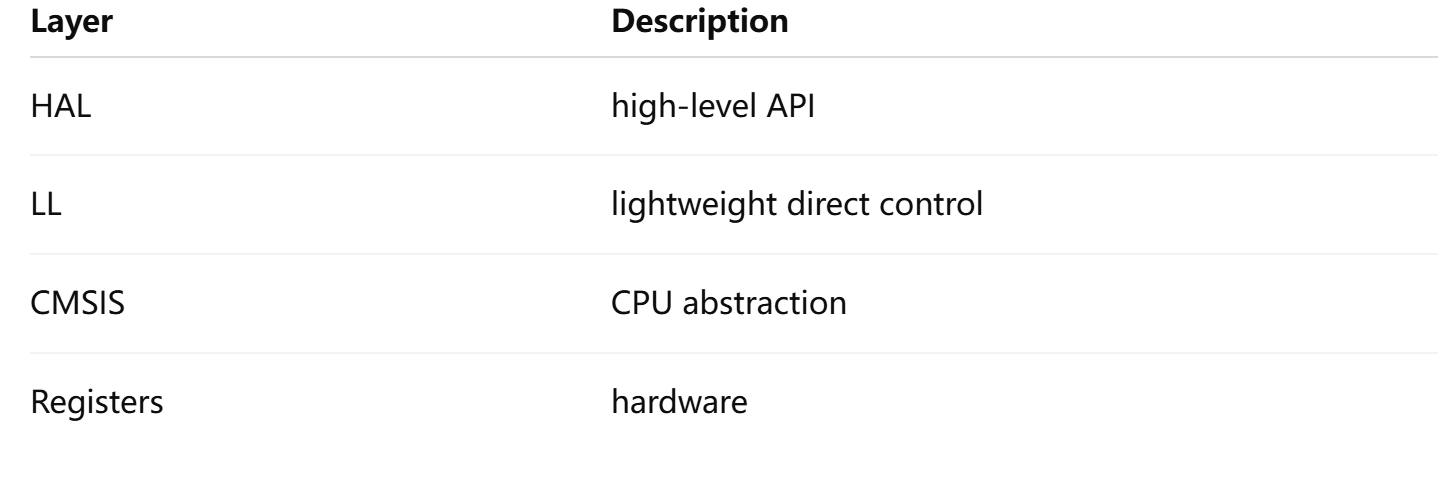
The STM32 firmware ecosystem is organized into layers.
Application
     │
     ├── HAL Drivers
     │
     ├── LL Drivers
     │
     ├── CMSIS
     │
     └── Hardware Registers
Each layer provides a different level of abstraction.
2. What is HAL?
HAL (Hardware Abstraction Layer) is a high-level driver framework provided by STMicroelectronics.
Goal:
Simplify firmware developmentHAL hides most hardware details and provides portable APIs.
Example HAL code:
HAL_GPIO_WritePin(GPIOA, GPIO_PIN_5, GPIO_PIN_SET);Instead of writing registers manually.
HAL advantages:
easy to use
portable between STM32 families
supported by STM32CubeMX
But there are tradeoffs:
larger code size
more abstraction layers
slightly slower execution
3. What is LL?
LL (Low Layer) drivers are a lightweight alternative to HAL.
Goal:
Provide near-register level controlExample:
LL_GPIO_SetOutputPin(GPIOA, LL_GPIO_PIN_5);Compared to HAL:
fewer checks
smaller code
faster execution
LL is essentially a thin wrapper over registers.
4. HAL vs LL Design Philosophy
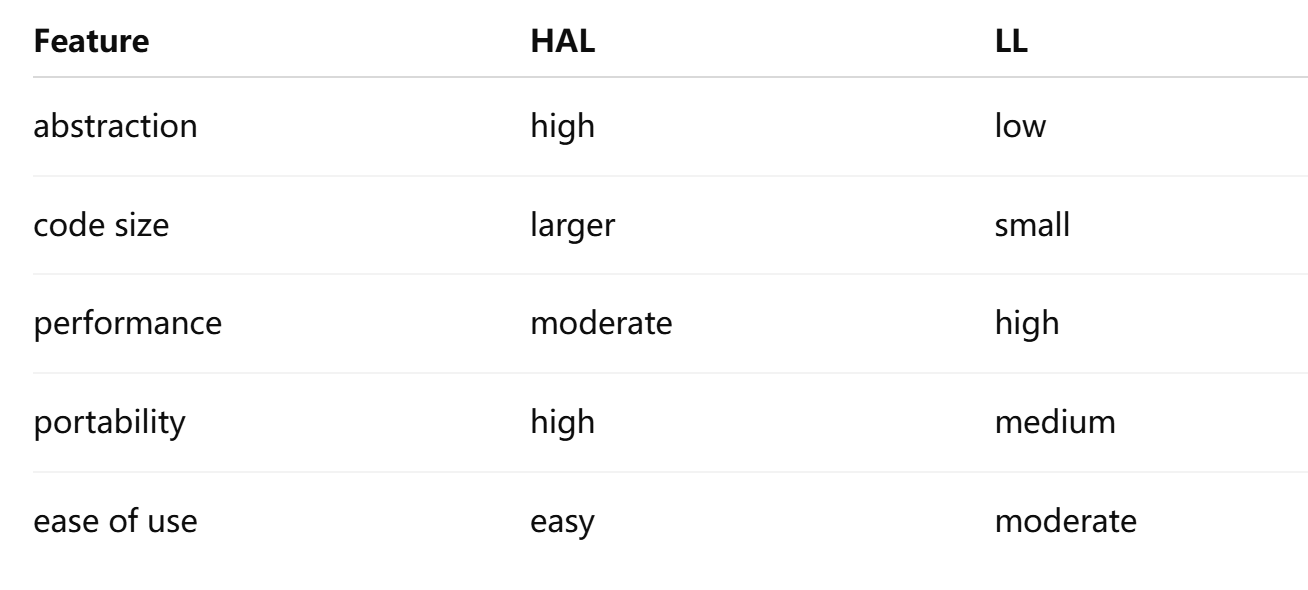
Typical usage patterns:
Application code → HAL
Performance-critical code → LL
Drivers / RTOS → CMSIS
5. SysTick as a Perfect Example
The SysTick timer is a core timer inside every Cortex-M processor.
It is widely used to generate the system tick interrupt.
Typical configuration:
1 millisecond interruptThis interrupt drives:
HAL delays
RTOS scheduling
system time base
6. SysTick Hardware Overview
SysTick contains only a few registers.
SysTick Registers
------------------

CTRL   control
LOAD   reload value
VAL    current counter
CALIB  calibration
When the counter reaches zero:
interrupt triggered
reload value loaded
counter restarts
7. Configuring SysTick with CMSIS (Bare Metal)
At the lowest level, SysTick is configured through CMSIS.
Example:
SysTick_Config(SystemCoreClock / 1000);This function configures:
1ms system tickEquivalent manual configuration:
SysTick->LOAD = SystemCoreClock/1000 - 1;
SysTick->VAL  = 0;

SysTick->CTRL =
      SysTick_CTRL_CLKSOURCE_Msk
    | SysTick_CTRL_TICKINT_Msk
    | SysTick_CTRL_ENABLE_Msk;
8. SysTick in HAL
In STM32 HAL, SysTick is automatically initialized during system startup.
Initialization flow:
main()
  ↓
HAL_Init()
  ↓
HAL_InitTick()
  ↓
SysTick_Config()
Inside HAL_Init():
HAL_InitTick(TICK_INT_PRIORITY);Which sets:
SysTick frequency = 1kHz9. HAL SysTick Handler
HAL implements a global tick counter.
uwTickThe interrupt handler:
void SysTick_Handler(void)
{
    HAL_IncTick();
}
Tick increment function:
void HAL_IncTick(void)
{
    uwTick++;
}
10. HAL Delay Implementation
HAL delays rely on the tick counter.
Example:
void HAL_Delay(uint32_t delay)
{
    uint32_t start = HAL_GetTick();

    while((HAL_GetTick() - start) < delay)
    {
    }
}
This creates a blocking delay.
HAL_GetTick() → returns milliseconds11. SysTick in LL Drivers
In STM32 LL, SysTick initialization is manual.
Example:
LL_Init1msTick(SystemCoreClock);This function calculates:
reload = SystemCoreClock / 1000Equivalent register configuration.
12. LL SysTick Handler
Example implementation:
volatile uint32_t tick;

void SysTick_Handler(void)
{
    tick++;
}
Access function:
uint32_t LL_GetTick(void)
{
    return tick;
}
Delay example:
uint32_t start = LL_GetTick();

while((LL_GetTick() - start) < 100);
13. HAL vs LL SysTick Flow
HAL adds additional abstraction.
HAL Flow
SysTick interrupt
        ↓
SysTick_Handler
        ↓
HAL_IncTick
        ↓
uwTick++
LL Flow
SysTick interrupt
        ↓
SysTick_Handler
        ↓
tick++
The LL path is shorter.
14. Performance Difference
HAL adds additional code layers:
Application
  ↓
HAL API
  ↓
HAL internal logic
  ↓
register write
LL path:
Application
  ↓
LL macro
  ↓
register write
Therefore:
LL = smaller + faster
HAL = easier + safer
15. How RTOS Uses SysTick
Real-time operating systems like FreeRTOS use SysTick as the scheduler clock.
Example scheduling timeline:
Time →

0ms   1ms   2ms   3ms
 |     |     |     |
Tick  Tick  Tick  Tick
 |     |     |     |
Scheduler decision
Each tick:
update system time
wake sleeping tasks
trigger context switch
16. When to Use HAL vs LL
Use HAL when
developing applications quickly
portability is important
using CubeMX auto code generation
Use LL when
performance is critical
code size must be minimal
precise hardware control is required
Many professional projects combine both:
HAL for drivers
LL for performance sections
17. The Big Picture
The STM32 firmware stack ultimately looks like this:
Application
     │
     ├── HAL API
     │
     ├── LL API
     │
     ├── CMSIS
     │
     └── Cortex-M Hardware
           │
        SysTick
SysTick provides the time base that drives:
HAL delays
application timers
RTOS scheduling
18. Key Takeaways
HAL and LL provide two different philosophies for firmware development.
HAL
easier
portable
feature rich
LL
lightweight
faster
closer to hardware
Using SysTick as an example clearly shows how both driver layers interact with the underlying Cortex-M hardware.
✅ In one sentence
HAL simplifies development while LL provides performance and control — and both ultimately rely on the same hardware like SysTick inside the Cortex-M core.